In October 2026, many IT contacts got the same warning: Synology NAS devices were in trouble. On October 22, Synology disclosed the PHP2Shell vulnerabilities. On October 29, it confirmed that attackers were targeting NAS devices that hadn't been updated, encrypting files and demanding ransom. A little earlier, in August, a hacker group offered live feeds from security cameras across Taiwan for sale on Telegram.
A NAS holds a company's contracts, design files, and financial records. A camera recorder captures everything that happens in the office, the store, and the warehouse. The attacks on them differ, but the underlying problem is the same: these devices have a door that opens straight onto the internet.
What Happened Recently
Synology NAS: PHP2Shell and the .L0CK3D Ransomware Wave
- PHP2Shell (October 22): Synology's security advisory rated the two vulnerabilities Critical. They affect packages that rely on PHP, such as Web Station, WordPress, Synology Calendar, and Mail Station, and let a remote attacker run arbitrary code on the NAS.
- Ransomware (October 29): In a press release, Synology said attackers were exploiting a vulnerability patched in December 2024 to target devices still running outdated versions of DSM, the NAS operating system, encrypting data and demanding ransom. Victims' files were renamed with a .L0CK3D extension.
- What the victims had in common: A roundup of victim reports by a Taiwanese security outlet found that most of the affected NAS devices had a sign-in page reachable directly from the internet. Some had port forwarding set up on the router, and others had UPnP turned on, letting the device open the door by itself.
- The official advice: On November 2, Hong Kong Computer Emergency Response Team Coordination Centre (HKCERT) issued an alert recommending that organizations avoid exposing the NAS management interface directly to the internet, turn off unnecessary services and port forwarding, and restrict remote access.
There's no public evidence so far that PHP2Shell was used in this ransomware wave, so the two should be treated as separate incidents. But coming in the same month, they point to the same lesson.
Security Cameras: Feeds Watched and Sold
- August 2026: A hacker group on Telegram claimed to have access to a Taiwanese police surveillance system and live feeds from about 900 cameras, and offered it for sale. After checking, the National Police Agency said the leaked footage didn't come from police intersection cameras. The Tainan City Government then asked operators to shut down at-risk systems, change passwords, and strengthen their firewalls.
- December 2025, South Korea: Police reported that about 120,000 IP cameras had been hacked. The suspects got in using simple, repetitive weak passwords, and sold footage from homes, clinics, and other places to an overseas website.
The Real Problem: A Door Facing the Street
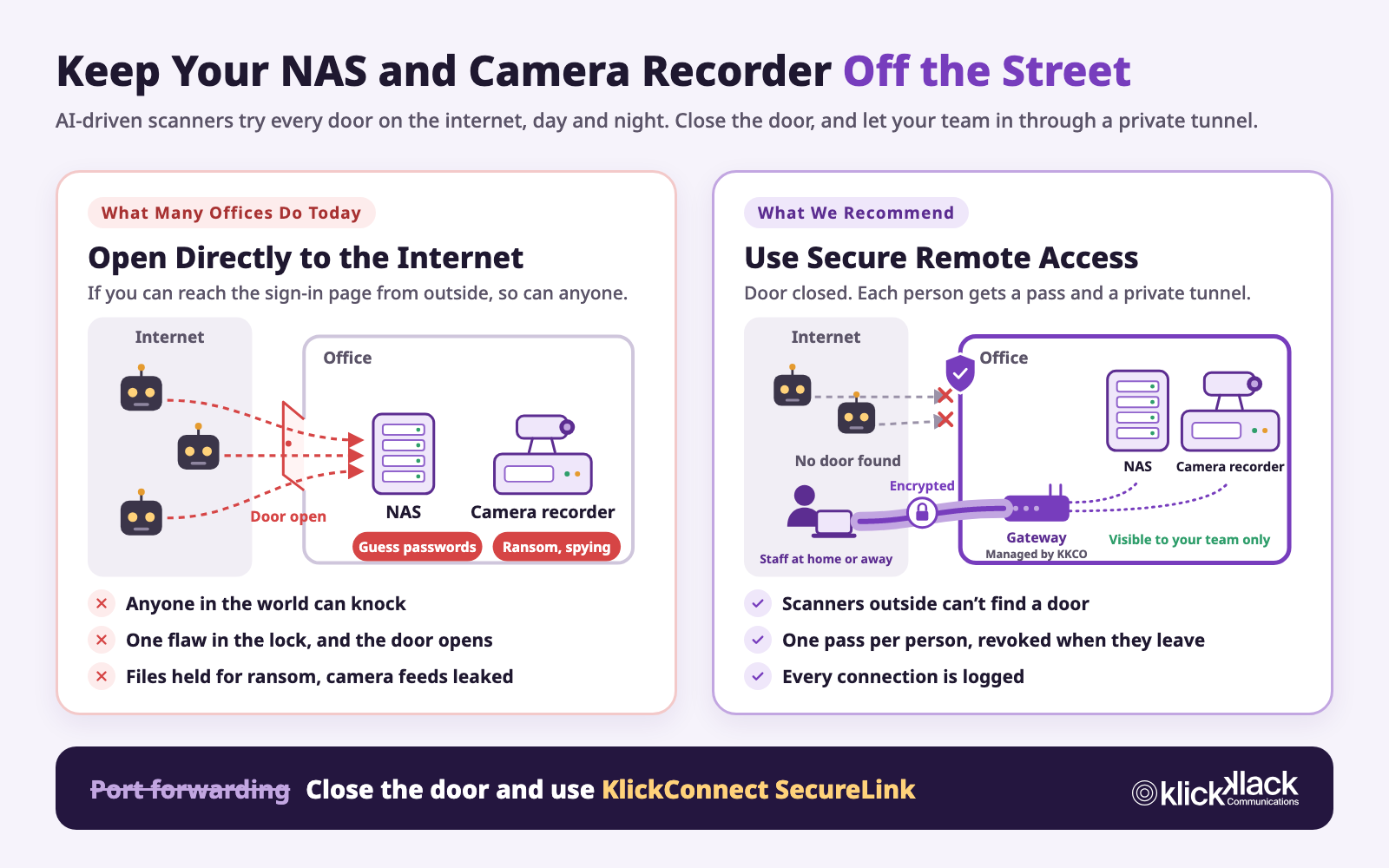
Picture the NAS as the company's filing cabinet, and the camera recorder as the security office. Normally, both sit safely inside the office.
But to reach files from home, or to check cameras on a phone, many companies set up "access from outside." That's like moving the filing cabinet's door out to the street, with only one lock (a password) keeping people out.
The internet is full of automated programs that scan every address, around the clock, and try every door they find. They don't pick targets, and they won't skip you because you're a small company. Once they find the door, there are two ways in:
- A flaw in the lock: That's a vulnerability. When a device's software has a defect, an attacker may not even need your password. From the moment a vulnerability goes public to the moment you install the update, the door is unlocked. The Synology ransomware used a flaw patched back in December 2024, and NAS devices that hadn't been updated in nearly two years were hit.
- An easy-to-guess key: The factory default password was never changed, or it's something like 1234 or the company name, or several people share one account.
AI Means More Knocks, Coming Faster
Breaking into a device used to take a skilled person time to research and try targets one by one. Now, AI can handle many of those steps automatically.
- Attacks can run almost on their own: In November 2025, AI company Anthropic reported that a group it assessed to be Chinese state-sponsored used AI tools to target about 30 organizations worldwide. AI carried out 80 to 90 percent of the campaign, with humans stepping in at only 4 to 6 key decision points. At its peak, the AI made thousands of requests, often several per second, a pace no human team could match.
- Taiwan's government agencies were hit, too: In August 2026, Taiwan's Ministry of Digital Affairs confirmed that hackers from outside Taiwan had combined AI agents with their own operations to attack government agencies. The ministry said AI agents can quickly chain together multiple attack techniques and use secondary systems, such as backup and test systems, as stepping stones, making attacks fast, cheap, and large in scale.
- Security incidents have tripled: At a Taiwan cybersecurity incident response conference on November 3, 2026, Jeremy Chiu (Birdman), chief technology officer of CyCraft, said that attackers now use AI across the board to automate intrusions, and that the number of security incidents has tripled.
For small and midsize businesses, this means two things. First, attackers used to have limited time and picked big targets worth the effort. AI doesn't get tired and doesn't care how big you are, so every open door on the internet gets tried. Second, attacks are getting faster, so the time you have to install an update after a vulnerability goes public is getting shorter, too. Jeremy Chiu's first recommendation for companies is to shrink the external attack surface: in other words, reduce the number of doors facing the internet.
Is Your Company Doing This, Too?
These setups are common, and many companies don't realize they've left a door on the street:
- To reach files from home, someone set up port forwarding on the router to the NAS, or turned on UPnP so the device opens the door itself.
- When the camera vendor installed the system, they opened the recorder to the internet so the owner could watch on a phone.
- The vendor said to plug the device straight into the modem from your internet provider, such as Chunghwa Telecom, so it gets its own public IP address, like a street address on the internet. With no router or firewall in front of it, the device is standing right on the street.
- The device still uses the factory default password, or several people share one account.
- The device hasn't been updated in years, or the manufacturer no longer supports it.
Not sure? Try one test: Turn off Wi-Fi on your phone and use cellular data. Can you open the sign-in page of your NAS or camera recorder? If you can, so can everyone else in the world.
The Right Way: Close the Door and Use a Private Tunnel
The most common way to reach the office securely from outside is a VPN (virtual private network). It creates an encrypted tunnel between each person's device and the office, like an underground passage only your team can use. The NAS and camera recorder stay inside the office, and nothing on the outside shows where the door is. Each person uses their own pass to go through the passage and reach the office, and once connected, it's as if they were sitting at their desk.
- Outsiders can't find a door: The devices are no longer public on the internet, so scanners have nothing to knock on.
- One pass per person: Everyone has their own. When someone leaves or loses a phone, you turn off just that one pass.
- Encrypted the whole way: Even on Wi-Fi in a coffee shop or hotel, no one can snoop on what passes through.
Closing the door doesn't mean you can stop updating. The NAS and camera recorder still need updates, strong passwords, two-factor authentication, and an offline backup. Secure remote access lowers the chance of the door being found, and these habits are the second and third lines of defense.
KlickConnect SecureLink: Secure Access as Easy as Signing In to Google
Many companies know a VPN is safer but never set one up, or set one up badly: configuration is a hassle, everyone shares one account, no one remembers to revoke access when someone leaves, and when something goes wrong, there's no way to tell who connected.
KlickConnect SecureLink is KlickKlack's secure remote access service. It works with the office network that KlickKlack manages and makes a VPN something your team can set up on their own, and your company can manage.
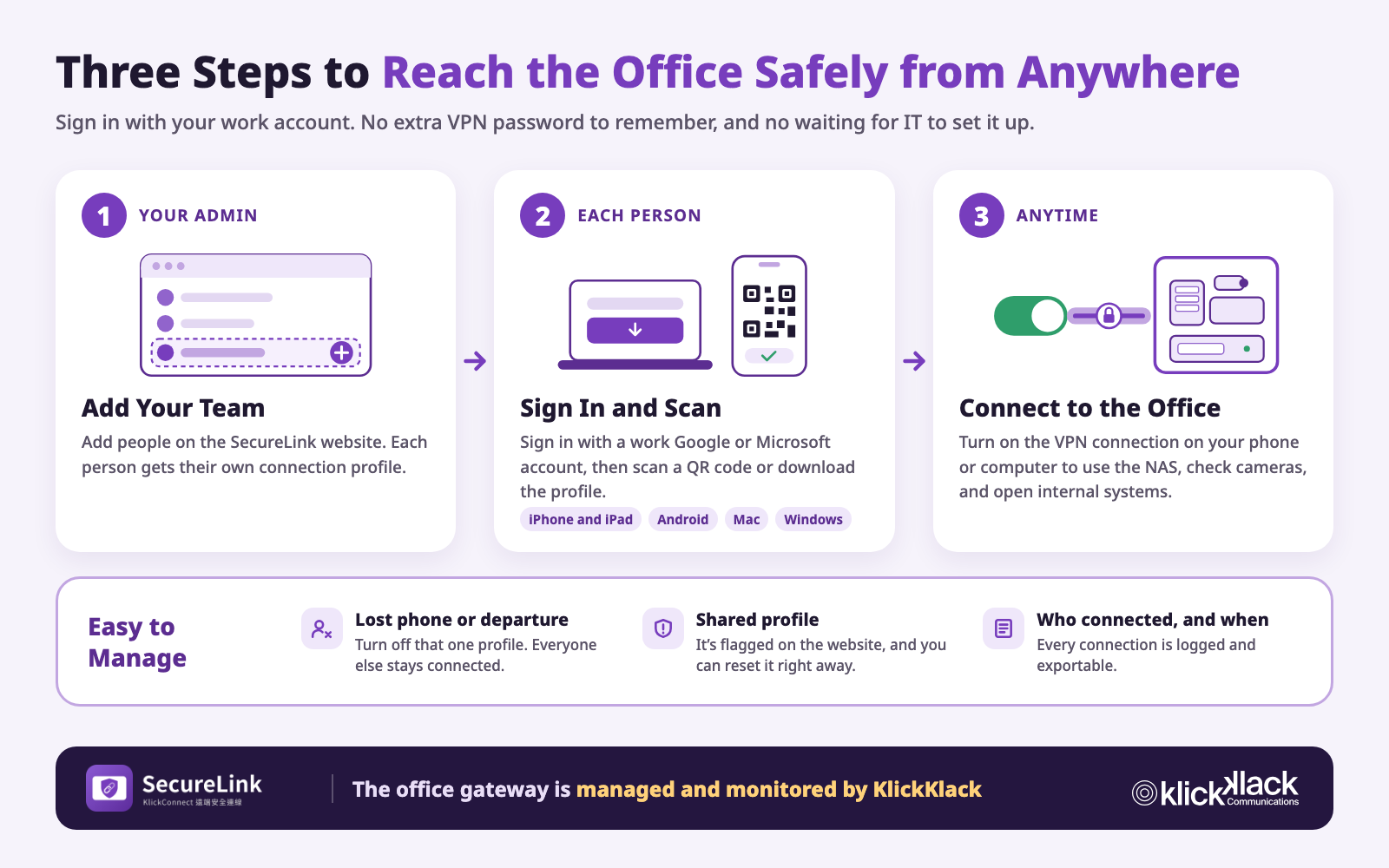
- Sign in with a work account: Team members sign in with their company Google or Microsoft account, or with a sign-in link sent by email, so there's no separate VPN password to remember.
- Set it up yourself: Scan a QR code on a phone or download the connection profile on a computer, then import it into the VPN app. It works on iPhone, iPad, Android, Mac, and Windows.
- One profile per person, no lending: Each connection profile belongs to one person and can't be reassigned. If the same profile is used on several devices at once, it's flagged on the website so you can reset it right away.
- Handle staffing changes on the web: Your company admin adds new team members and turns off profiles for people who leave on the SecureLink website, without waiting on a vendor.
- Confirm identity for sensitive actions: If it's been more than 10 minutes since you last verified your identity, you have to verify again before downloading a profile or showing its QR code, so no one can grab one from an unattended computer.
- Every connection is logged: Who connected, when, and from where are all recorded and can be exported, and the activity log can only be added to, never edited, so the records are there when you need them for an audit.
- KlickKlack takes care of the office gateway: Gateway setup, monitoring, and maintenance are handled by KlickKlack. If the gateway goes offline, team members see a notice on their SecureLink page.
Six Things You Can Do Today
- Test from outside: Turn off Wi-Fi on your phone, use cellular data, and try to open the sign-in page of your NAS or camera recorder.
- Close the door: Remove port forwarding rules on the router that point to these devices, and turn off UPnP. If a device is plugged straight into the modem, move it behind a router with a firewall.
- Switch remote access to a VPN: Have your team come back through secure remote access instead of the open internet.
- Update: Update DSM, firmware, and packages to the latest versions, and plan to replace any device the manufacturer no longer supports.
- Fix accounts: Change default passwords, turn on two-factor authentication, and give each person their own account.
- Back up offline: Keep an offline copy of important data, and test a restore regularly.
KlickKlack: Remote Access Is Part of Your Network, Too
KlickKlack has focused on enterprise network services for more than a decade. KlickConnect delivers the office network as NaaS (Network as a Service), covering planning, equipment, monitoring, and ongoing operations end to end. SecureLink brings remote access into the same managed service, so your team can reach the office safely from anywhere, without opening your NAS or camera recorder to the world.
If you're not sure whether your company's NAS or camera recorder is exposed to the internet, contact us. We can help you check and plan the move to secure remote access. Learn more about KlickConnect Office Network Services.