The Spec Says 200, but Smooth Service Tops Out at 20 to 30
Ten minutes before the opening, there's a line at registration. Guests pull out their phones to scan a QR code and check in. Some are posting, some are sending photos to colleagues, and then the host announces, "Scan the QR code on the screen to join the poll." A second later, every phone in the room is spinning.
Before the event, the vendor said: "This access point is rated for 200 people. You only have 150, so one is plenty."
The spec sheet wasn't lying. That number was just never "how many people can use it smoothly." Here's what the equipment makers themselves say:
- The theoretical ceiling: Cisco Meraki's documentation lists a theoretical maximum of 512 devices per radio and 1,024 per access point (AP) for Wi-Fi 6, and states plainly that this is only a theoretical figure. In real deployments, interference from many devices talking at once pushes the limit far lower.
- The design recommendation: The same vendor's high-density deployment guide recommends planning for about 25 devices per radio, or about 50 per AP, in high-density venues. More than 30 devices on one AP already counts as high density.
- The vendor's own conference: At Cisco Live Amsterdam 2024, Cisco's own annual conference, more than 730 APs covered the main conference, keynote, and breakout areas. At peak, 16,024 devices were connected at the same time, fewer than 22 per AP on average.
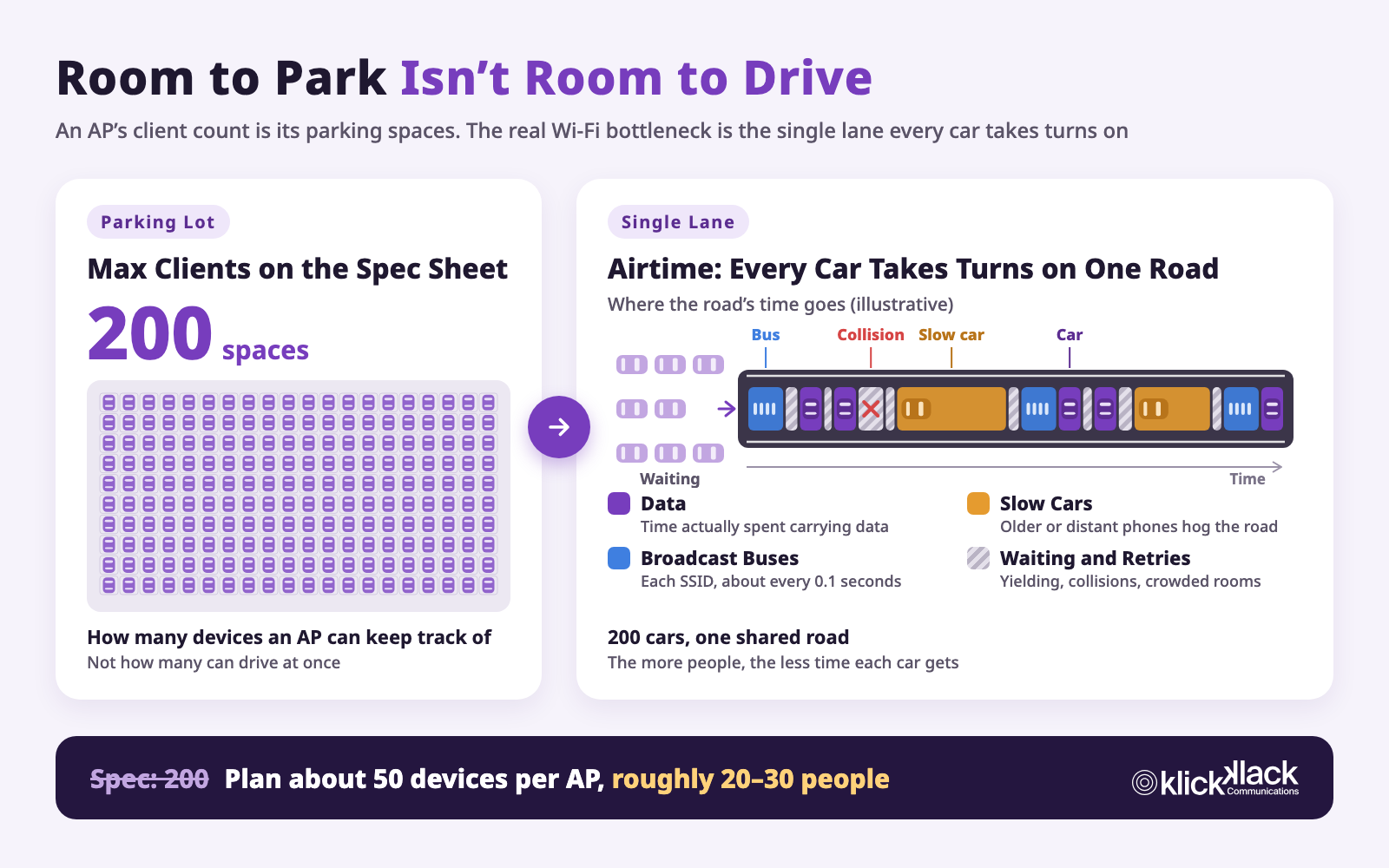
Each guest usually carries a phone, a laptop, and a smartwatch, and some bring a tablet too. Plan for 50 devices per AP and that works out to roughly 20 to 30 people. Between the 200 on the spec sheet and the 20 to 30 in practice, the gap is 7 to 10 times.
Why such a big gap? Picture Wi-Fi as a parking lot and a road.
"200 People" Means Parking Spaces, Not Lanes
The "max clients" figure on an AP's spec sheet means how many devices the AP can keep track of at once, like how many spaces a parking lot has. Two hundred spaces means 200 cars can park.
But being able to park doesn't mean being able to drive out. Guests aren't there to park. They're there to go somewhere: scroll social media, send photos, join video calls, and submit votes. Every one of those actions is a car pulling onto the road.
So the real question isn't how many spaces the lot has. It's this: when everyone wants to leave at the same time, is there enough road?
And the Wi-Fi road is much narrower than most people think.
The Wi-Fi Road Is a Single Lane
A Wi-Fi channel is like a single-lane road that every car takes turns on. Data from the AP to a phone and from a phone to the AP share the same road in both directions. MU-MIMO (multi-user, multiple input, multiple output), introduced with Wi-Fi 5, and OFDMA (orthogonal frequency-division multiple access) in Wi-Fi 6 let a few cars run side by side or share a ride, as covered later. But most of the time, only one car is on the road at any given moment.
The time this road can hand out each second is called airtime. Airtime is fixed. It doesn't grow when more people show up. With 200 devices on one channel, there aren't 200 lanes. There are 200 cars queuing for time on the same road.
Worse, not all of that time goes to carrying data. Four things keep eating it.
Slow Cars Block the Road
Not every car drives at the same speed. A newer phone close to the AP is a sports car, transmitting at a high data rate. A phone far from the AP, or one that's several years old, is a slow old clunker.
Sending the same 1 MB photo takes about 0.04 seconds at 200 Mbps but 0.8 seconds at 10 Mbps, 20 times as much road time. On a single lane, however slow the car in front is, everyone behind it waits. A few devices with weak signal in the corners of a venue can drag down the whole road.
Every Car Has to Yield Before Pulling Out
Wi-Fi has no traffic lights. Before pulling onto the road, each car checks whether anything's coming, then waits a short random time before going, so two cars don't pull out at once and collide. If they do collide, both back up and try again.
With only a few cars around, these rules cost almost nothing. As traffic grows, the time spent waiting and retrying after collisions climbs fast. And every trip carries the same startup wait, whether the car is carrying a photo or a single notification. At events, most of the traffic is exactly that kind of tiny parcel: messages, notifications, and background app sync. They carry very little but still take up road time.
A Slow Bus on a Fixed Schedule
For every Wi-Fi network name, or SSID (service set identifier), the AP broadcasts "I'm here" about every 0.1 seconds so phones know the network exists. These broadcasts go out at the slowest, safest data rate, like a slow bus on a fixed schedule that takes over the road every 0.1 seconds.
A "Guest" network is one bus route. Add "Staff," "Media," "VIP," and "Exhibitors," and that's five routes. A calculation from Juniper Mist shows that on 2.4 GHz with broadcasts at the lowest rate, one AP with 6 SSIDs spends about 19% of its airtime on broadcasts alone. If 5 such APs can hear each other on the same channel, broadcasts eat about 97%, leaving almost no road for actual data. That's why Cisco Meraki recommends no more than 3 SSIDs, and says that in high-density environments the recommendation becomes a requirement.
There's another kind of car too. Phones constantly ask, "Is there a network here I've joined before?" They're like cars circling the lot looking for a space: not going anywhere, but still taking up the road.
A Full House Means Bad Road Conditions
The 2.4 GHz and 5 GHz signals Wi-Fi uses are easily absorbed by water, and the human body is mostly water. In an empty room, signals travel freely. Pack in 300 people and signals weaken, data rates drop, and anything that doesn't get through has to make another trip.
That's why so many events find that the network was fine at rehearsal but fell over at the opening. At rehearsal there were five cars on a dry road. At the event, 300 cars pulled out at once, in a downpour.
Do the Math Once
Cisco Meraki's high-density guide uses a practical formula: the bandwidth each person needs, times the number of people using it at once, divided by the throughput one AP can actually deliver.
The guide notes that a device's real-world throughput is roughly half its advertised data rate, and should be discounted further. In its example, one AP delivers about 100 Mbps of usable wireless throughput. At the example's 3 Mbps per person, one AP can handle only about 33 people using it at the same time. And that's before slow cars, buses, and rain are factored in.
Why Adding More APs Doesn't Always Help
The instinctive fix is to add more APs. But if a new AP uses the same channel as an existing one and they can hear each other, they're sharing the same road. It's like opening more parking lot exits that all feed into the same single lane: cars still pile up, and since every AP runs its own buses, the road gets even more crowded.
What actually works is opening more separate roads, with each road serving only the cars nearby:
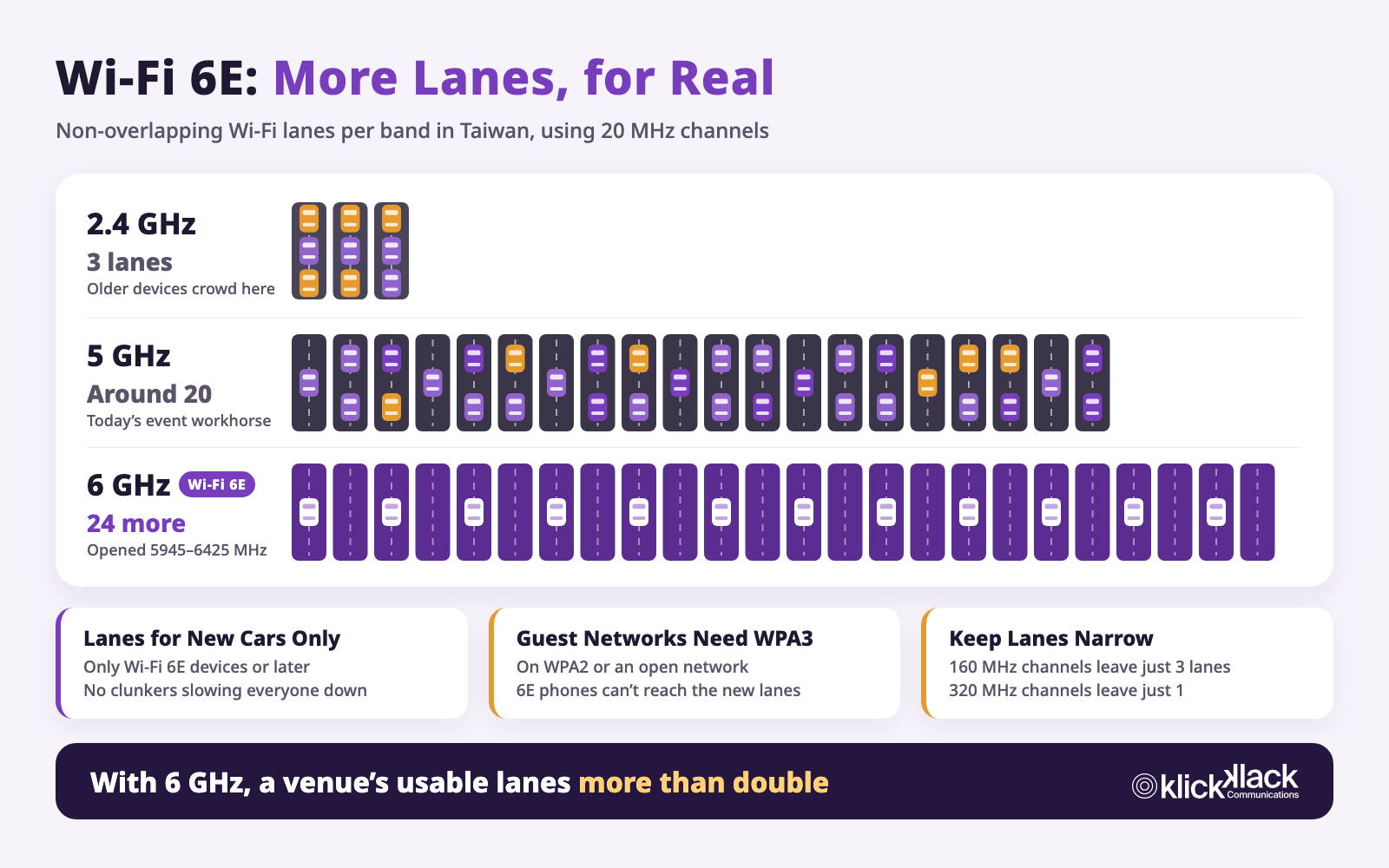
- Put neighboring APs on different channels: Each channel is an independent road, and channels don't compete for time. 2.4 GHz has only 3 non-overlapping roads, 5 GHz has around 20, and devices that support Wi-Fi 6E get 24 more on 6 GHz, so high-density venues steer as many devices as possible to 5 GHz and 6 GHz.
- Lower power and shrink coverage: A stronger AP signal isn't better. The smaller the area, the fewer people each AP serves, and the less it interferes with neighboring APs on the same channel.
- Prefer narrower roads: Wi-Fi can merge several lanes into one extra-wide lane so a big truck can carry more per trip, but however wide the road is, everyone still takes turns. In a crowded venue, four separate roads serving four areas at once beat one road four lanes wide. Cisco Meraki's guide also recommends 20 MHz channels for high-density venues.
- Set a minimum speed: Setting a minimum data rate is like banning cars that drive too slowly. Devices switch to a closer, faster AP, and the broadcast buses speed up too.
- Move everything that can be wired off the road: If livestream encoders, check-in kiosks, and stage equipment can use an Ethernet cable, they shouldn't compete with guests for Wi-Fi.
Can Wi-Fi 6E and Wi-Fi 7 Fix It?
They help a lot, but it's worth separating two things. Wi-Fi 6E actually opens new roads, while technologies like MU-MIMO and OFDMA make the same road easier to drive.
Wi-Fi 6E: A Whole New Set of Lanes for New Cars Only
Wi-Fi 6E brings Wi-Fi into the new 6 GHz band. In August 2023, Taiwan's Ministry of Digital Affairs opened 5945–6425 MHz for Wi-Fi. Divided into 20 MHz channels, that's 24 more non-overlapping lanes. Compared with 3 on 2.4 GHz and around 20 on 5 GHz, the number of roads a venue can run at once more than doubles.
And the new road isn't just more of the same:
- Lanes for new cars only: Only Wi-Fi 6E devices or later can use 6 GHz. There are no years-old clunkers on the road, every car supports ride-sharing, and they all drive faster.
- Fewer cars circling for a space: On 6 GHz, phones don't send queries on every road. Instead, APs announce in their 2.4 GHz and 5 GHz broadcasts that there's a road on 6 GHz too, and phones head straight there. There's much less management traffic on the road.
- Moving new cars off clears the old roads too: Once newer phones and laptops move to 6 GHz, 5 GHz airtime is left for guests with older devices. Even if not everyone supports Wi-Fi 6E, the whole venue benefits.
But there are a few things to watch for when planning 6 GHz:
- Guest networks must use WPA3: 6 GHz requires WPA3, and open networks must switch to the encrypted Enhanced Open, also called OWE (Opportunistic Wireless Encryption). WPA2 and unencrypted networks aren't allowed. Many event guest networks still use WPA2, or an open network with a sign-in page. With those settings, even phones that support Wi-Fi 6E can't get onto 6 GHz. At Cisco Live Amsterdam 2024, the team found that 9% of devices on the WPA2 network actually supported Wi-Fi 6E but had to stay crowded onto 2.4 GHz and 5 GHz.
- Shorter range: Higher frequencies are more easily blocked by walls and bodies, so each AP covers a smaller area than on 5 GHz. In high-density venues that's actually a good thing, since each AP serves fewer people, but AP placement and count can't be estimated from 5 GHz distances.
- Don't merge the new road into extra-wide lanes: Taiwan's 480 MHz yields 24 lanes at 20 MHz. At 160 MHz, only 3 are left, and at 320 MHz, just 1. In a crowded venue, the number of lanes matters more than how wide each one is.
- Limited help outdoors: Taiwan allows only very low power for outdoor 6 GHz use, so large outdoor events still rely on 5 GHz planning.
MU-MIMO, OFDMA, and MLO: Making the Same Road Easier to Drive
The other new technologies don't add roads. They let the same road carry more:
- MU-MIMO, temporary side-by-side lanes: Using multiple antennas, the AP sends data to several devices in different directions at once, like painting a few temporary lanes side by side on the same road. But how many can run side by side depends on how many antennas the AP has. Common enterprise APs are 4×4, high-end models are 8×8, and the Wi-Fi 6 standard tops out at 8 devices at once, a long way from 200. Before each side-by-side run, the AP also has to survey the road, and the devices need to be in different directions and not moving much. At an event where people are packed in, constantly moving, and sending small packets, chances to run side by side are far fewer than in a lab.
- OFDMA, ride-sharing: Wi-Fi 6 lets one trip carry data for several devices at once, which is especially effective for floods of tiny parcels like messages and notifications.
- BSS Coloring, telling the neighbors' cars apart: Wi-Fi 6 lets devices recognize that a car belongs to the AP next door. When its signal is weak enough, they don't have to stop and yield, which reduces how much APs on the same channel hold each other back.
- MLO, one car on several roads at once: Wi-Fi 7 devices with Multi-Link Operation (MLO) can connect over 2.4 GHz, 5 GHz, and 6 GHz at the same time, taking whichever road is clear or using several together. That's a big help for latency and stability. But the total number of roads in the venue hasn't changed, and if everyone uses several at once, each road is just as crowded.
6 GHz adds 24 roads and the other technologies make each road more efficient, but even together they don't make one AP able to serve 200 people smoothly at once. They also depend on devices supporting them. Even at Cisco Live Amsterdam 2024, a room full of network engineers, 2 in 10 devices at peak were still Wi-Fi 5, and typical events have even more older devices. The figure of fewer than 22 devices per AP mentioned earlier came from a venue where more than 70% of devices were Wi-Fi 6. New equipment is a better tool, not a reason to skip planning.
Not Just Lanes: Parking Permits and the Access Road
Besides airtime, two other common problems leave people with signal but no internet.
The parking permits run out: After a device connects, it still needs an IP address to get online, like the permit handed out at the lot entrance. Many networks use a default range with only 253 permits once the gateway takes one. With each guest carrying a phone, a laptop, a smartwatch, and maybe a tablet, the permits are gone before 100 people arrive. If the lease time is long, devices that already left keep holding their permits, and exhibitions with people constantly coming and going are especially prone to this.
The access road is too narrow: However smoothly traffic flows inside, if the internet connection out of the lot isn't big enough, everyone still jams up at the exit. For events with livestreams especially, upload bandwidth often runs out before download.
Back to Your Event: Where Each Network Profile Gets Stuck
KlickKlack's Event Network Services group event networks into three profiles. Seen through airtime, each one carries a different risk.
Content-Driven: Don't Let Content Compete with the Audience for the Road
Breakout presentations, the agenda app, on-site screens and digital signage, breakout livestreams, and online viewers: for this kind of content, what matters most is getting it out reliably. The most common failure is playback and streaming gear sharing the same single lane with hundreds of phones in the audience. The moment everyone uploads photos, the picture starts buffering.
The fix is to move content gear off the shared road. Wire it first and give it dedicated bandwidth. If something truly must be wireless, give it its own channel and priority, separate from guest Wi-Fi. The keynote livestream and on-stage demos have even less room for error, so they're covered under mission-critical below.
Interaction-Driven: Design for the Peak, Not the Average
Polls, Q&A, exhibition booths, QR code check-in, and listening to simultaneous interpretation on phones all share one trait: everyone uses them at once. The moment the host says "scan the QR code," every car in the room pulls out in the same second, and that's when airtime runs out fastest.
So capacity has to be estimated for the peak, not the all-day average. The number to calculate is the most devices that will compete for the road at the same moment. AP count, placement, channel plan, and coverage follow from that, along with keeping SSIDs to a minimum and raising the minimum data rate.
At the 2026 Rotary International Convention, more than 37,000 attendees listened to real-time AI translation on their phones. KlickKlack deployed nearly 1,000 APs across four venues, fewer than 40 attendees per AP on average. That wasn't because an AP can only connect that many devices. It was so everyone could still use the network smoothly at the same time.
Mission-Critical: The Most Important Connections Stay Off Wi-Fi
Some connections get no second chance if anything goes wrong: the keynote livestream, the product demo on stage, esports players' match connections, and the competition network at a security contest.
The keynote is especially risky because it's also when the most people are in one room. At Cisco Live San Francisco 2014, about 7,000 devices connected to Wi-Fi in the keynote hall alone. At Cisco Live Amsterdam 2024, the keynote area got its own 92 APs and dedicated controllers. The moment thousands of phones in the audience start taking photos, uploading, and posting is exactly when the livestream and demo on stage can least afford to fail.
So these connections always come off shared Wi-Fi:
- Keynote livestream: The encoder runs wired with dedicated bandwidth, plus a backup line from a different carrier. If the primary feed drops, it fails over automatically, and online viewers never see the screen go black.
- On-stage demo: Demo gear runs wired on its own network segment, with a full run-through of the real show flow at rehearsal. If the demo itself is meant to show off wireless features, such as on a phone or wearable, it gets its own channel, separate from audience Wi-Fi.
- Esports tournaments and security competitions: Players and competing teams are always wired. Wi-Fi for the audience, media, and staff is planned separately and fully isolated from competition traffic, so no matter how many people in the audience post and upload, it never touches the match connections.
Real events usually combine two or three profiles. A conference might have breakout presentations (content-driven), polls (interaction-driven), and a keynote livestream and demo (mission-critical). Planning doesn't start with how many devices one AP can connect. It starts with which traffic can share Wi-Fi, which has to move off it, and how many cars will hit the road at the peak.
Next Time a Vendor Says "One AP Handles 200," Ask These Questions
- How many APs, and how many devices per AP? If the answer is 100 or more per AP, ask what that's based on.
- Where will the APs go? Is placement planned from the floor plan and where people will be, or is it one per area?
- How many channels, and what channel width? Will neighboring APs end up on the same channel?
- How many Wi-Fi network names? Each one adds another slow bus route.
- Is 6 GHz enabled, and what security does the guest network use? If it's still WPA2 or an open network, Wi-Fi 6E devices can't use the new roads.
- How big is the IP address pool, and how long are leases? Are there enough parking permits to go around?
- How are the keynote livestream and demos connected? Are they wired, and is there a backup line?
- Have you run an event this size? Can they tell you the headcount, the AP count, and what actually happened at peak?
If the only answer is "this model has great specs and supports lots of people," you can be fairly sure no one has actually planned your event's network yet.
KlickKlack: Planning for Your Peak, Not the Spec Sheet
KlickKlack has provided professional event networks since 2017, more than 1,000 events in all, from corporate conferences with a few hundred guests and esports tournaments to an international convention with more than 37,000 attendees. KlickKlack delivers event networks as NaaS (Network as a Service), handling planning, equipment, and on-site operations end to end, so organizers don't have to buy equipment or find someone to configure it for a single event.
- Planning starts from the event flow: The agenda, interactive moments, and peaks come first. AP count, placement, and channel plan follow from them, instead of being estimated from the client count on a spec sheet.
- Site survey and testing beforehand: Walls, ceilings, interference sources, and real coverage all get checked, not just a single test in an empty room.
- Designed around the three network profiles: Keynote livestreams and demos run wired with backup, what needs isolating is isolated, and what needs priority gets dedicated bandwidth.
- Enterprise-grade equipment: Cisco, Ruckus, Aruba, and other enterprise network gear, tuned by engineers for each venue.
- Engineers on site with live monitoring: Engineers watch every channel's utilization and connections throughout the event and act before the peak hits.
- One point of contact throughout: KlickKlack coordinates with venue IT, carriers, and other vendors, so organizers can focus on the event itself.
The best network is one nobody thinks about all event long. KlickKlack's job is to make sure every guest can get on the road the second they need the network most.