Apple officially launched Apple Business on April 14, 2026. The unified platform consolidates Apple Business Manager, Apple Business Essentials, and Apple Business Connect into a single, comprehensive offering, available in over 200 countries and regions worldwide.
Susan Prescott, Apple's Vice President of Education and Enterprise Marketing, said: "We've spent decades helping businesses of all sizes leverage Apple products and services to drive operations and growth, and Apple Business represents a major advance in this area. We've brought together Apple's strongest enterprise capabilities into a simple and secure platform, providing key features for organizations of every stage and industry — including built-in device management, collaboration tools, and new ways to reach customers."
For enterprises, this is more than a rebrand. Existing Apple Business Manager users see an updated interface, Business Essentials customers no longer pay monthly management fees, and every supported Apple device, from iPhone to Apple Vision Pro, can be managed through the same platform.
And here's what matters most: Apple Business Essentials was previously only available as a paid subscription in the US. With Apple Business, these features now expand to 200+ countries worldwide (including Taiwan), and they're free for everyone. For Taiwan SMBs, this means Apple's official MDM baseline is now freely accessible: capabilities that previously required a third-party MDM are now available out of the box.
This article covers the complete capabilities of Apple Business, the transition timeline, and the critical question: when is the native MDM in Apple Business enough, and when do you need a professional solution like Jamf?
Supported Devices
Apple Business provides comprehensive management for Apple's full device ecosystem:
- iPhone: mobile device management and business applications
- iPad: enterprise productivity and education deployment
- Mac: complete desktop and laptop management
- Apple TV: meeting rooms and commercial displays
- Apple Vision Pro: spatial computing workflows
- Apple Watch: employee identity and health management
Important: Devices must run iOS 26, iPadOS 26, or macOS 26 or later to use Apple Business.
1. Run Your Business: Complete Operational Tools
🇺🇸 Regional availability note: Several features below are currently US-only and not yet available in Taiwan or most other markets, including Mail / Calendar / Directory services, iCloud storage purchases, and AppleCare+ for Business. See the "Important Notes" section at the end for the full Taiwan availability picture. Refer to Apple's official announcements for the authoritative list.
Apple Business provides a native Apple device management solution, letting organizations remotely configure, deploy, and manage all Apple devices from a single interface, whether devices are corporate-owned or employee-owned.
Complete Device Management
- Remote configuration and policy management
- Both COPE (corporate-owned) and BYOD (bring your own device) supported
- Integrates with built-in MDM or third-party MDM solutions
Configurations and Blueprints
- Configurations: create security, network, and other device settings
- Blueprints: automate app and device configuration assignment, enabling "configure once, deploy everywhere". Apple specifically designed Blueprints to help small businesses without dedicated IT resources get started quickly, so new Apple devices work right out of the box
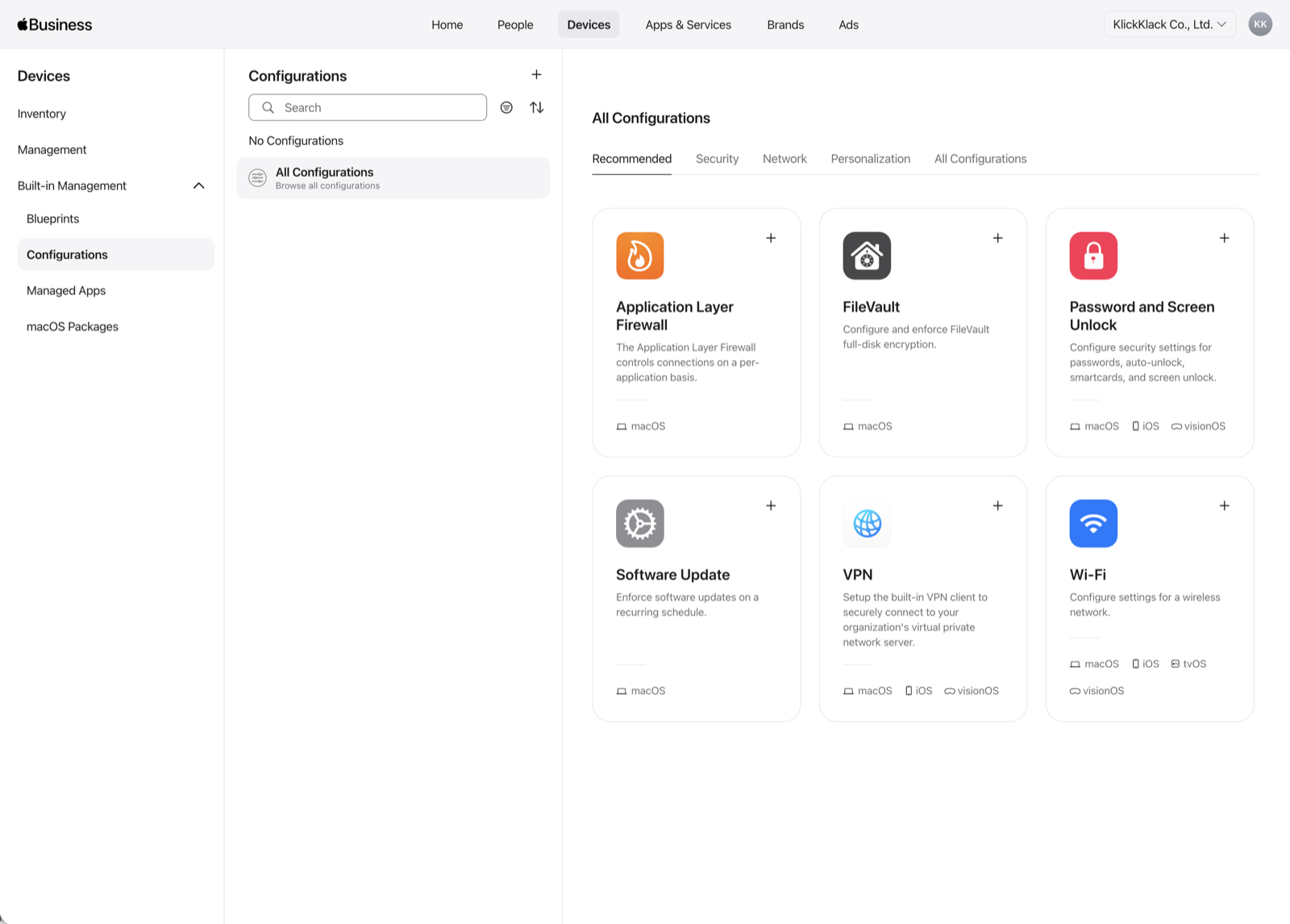
KlickKlack's actual Configurations panel in Apple Business, covering macOS categories like Application Layer Firewall, FileVault, Password and Screen Unlock, Software Update, VPN, and Wi-Fi
Automated Device Enrollment
Streamlines initial setup without touching or preparing devices beforehand. Devices added to the organization at time of purchase auto-enroll into built-in or third-party MDM. Supported purchase channels:
- Directly from Apple
- Apple Authorized Resellers
- Authorized cellular carriers
- Apple Configurator
Apps and Books at Scale
Purchase app and book licenses in volume and wirelessly deploy, install, and update them to specific devices or users. Your organization retains full ownership of purchased licenses and can revoke and reassign apps to different devices and users in any country where the app is available from the App Store.
Managed Apple Accounts
Create and manage Apple Accounts for employees at scale, for:
- Account-driven enrollment workflows
- Keeping organizational data separate from personal data through robust management controls
- Identity and access management defining what services employees can use
- Custom roles for granular permissions
Federated Authentication
Integrate with your existing identity provider (IdP), so employees sign in with their existing organizational credentials:
- Google Workspace
- Microsoft Entra ID
- Okta
- Other SAML / OIDC-compatible IdPs
User accounts sync automatically, so employees don't need to manage a separate Apple-specific login.
Professional Business Email
Get professional email on your organization's domain, synced across devices and web:
- Domain Connect: one-click domain configuration
- Cross-device and web synchronization
- Native integration with Managed Apple Accounts
Business Calendars
Calendar services integrated with email, syncing across devices and web. Simplifies meeting scheduling and project coordination.
Company Directory
Built-in company directory for team connectivity:
- Customizable contact cards (preferred names, pronouns)
- Group email addresses for user groups
- Personal information maintained through the Apple Business app
iCloud Storage
Additional iCloud storage for Managed Apple Accounts:
- Up to 2 TB per employee
- Secure backup and anywhere access
- Seamless collaboration
AppleCare+ for Business
Flexible enterprise-grade Apple support:
- 24/7 priority phone support
- Dedicated Customer Success Managers
- Specialized training modules
- Flexible hardware repair plans
2. Grow Your Brand: Customer-Facing Brand Management
Apple Business also provides unique brand management capabilities that pure MDM solutions don't offer, suited for businesses with customer-facing operations.
Visual Brand Identity
Consistent brand presence across Apple features and apps:
- Branded Mail: branded emails sent by employees
- Tap to Pay on iPhone: brand name and logo displayed during contactless payments
Discovery Everywhere
Your brand appears across the Apple ecosystem:
- Apple Maps
- Apple Wallet
- Siri
- Spotlight search
- Messages, Calendar, and other system apps
Physical Business Locations
For brick-and-mortar businesses:
- Precise entrance location: accurately mark each physical location's entrance
- Customizable place cards: branded information in Maps, Siri, Calendar, Messages, and Spotlight
- Showcases: highlight new items, deals, or promotional content with CTAs on your place card
- Location Analytics: search, browse, and click data from Apple Maps
Tap to Pay on iPhone
Accept contactless payments directly on iPhone, with no additional card reader or hardware needed.
Transition Timeline
| Item | Details |
|---|---|
| Official Launch Date | April 14, 2026 ✅ |
| Replaced Services | Apple Business Manager, Apple Business Essentials, Apple Business Connect |
| Pricing | Free for existing and new users |
| Fee Changes | Business Essentials customers no longer pay monthly device management fees |
| Data Migration | Existing data (locations, photos, account info) automatically migrated |
| Required OS | iOS 26, iPadOS 26, or macOS 26 or later |
| Availability | 200+ countries and regions worldwide |
⚠️ Important Notes: Taiwan Regional Availability
Apple Business is available in 200+ countries and regions, but feature availability varies significantly by country. According to Apple's official documentation, the following features are currently available in Taiwan:
- Built-in device management (includes Blueprints, Configurations, Managed Apple Accounts, and more)
- Managed Apple Accounts (with federated authentication)
- Zero-touch deployment
- Get Apps (volume app licenses)
- Brand and Location Management
- Branded Mail
- Tap to Pay on iPhone (see supported banks below)
Features not yet available in Taiwan:
- Get Books (volume book licenses)
- Mail, Calendar, and Directory services (professional business email, calendars, company directory)
- iCloud storage purchases (up to 2 TB per employee paid plans)
- AppleCare+ for Business (24/7 phone support, Customer Success Managers)
- Verify with Wallet on the Web
Supported banks and service providers for Tap to Pay on iPhone in Taiwan:
- CTBC Bank
- Fubon Bank
- Taishin Bank
- Global Payments
- Intella
- TapPay (SDK)
- TURN CLOUD
Refer to Apple's official announcements for the latest availability.
Other notes:
- Zero-touch deployment only applies to devices purchased through Apple or Apple Authorized Resellers
- Existing Business Connect data (claimed locations, place card info, photos, organization and account info) is automatically migrated when Apple Business goes live
- Apple Business companion apps, email, calendar, and directory features require iOS 26, iPadOS 26, or macOS 26
Apple Business Compared with Professional MDM (Such as Jamf)
Apple Business represents a major shift in Apple's approach to enterprise management. Its native MDM capabilities are significantly enhanced, but it still plays a different and complementary role to professional MDM solutions like Jamf.
✅ When Apple Business Native MDM Alone Is Sufficient
- Small and mid-sized businesses (fewer than 100 Apple devices)
- Single-ecosystem environments (pure Mac / iPhone / iPad, minimal Windows)
- Basic device enrollment, app distribution, and policy management
- Brand and location management needs (brick-and-mortar, multi-location retail, service businesses)
- Organizations without any MDM yet: Apple Business is a great free starting point
- Environments with limited compliance reporting requirements
⚠️ When You Need Professional MDM
When any of these apply, Apple Business alone isn't enough:
- Complex security policy enforcement: GCB compliance, financial sector regulation, listed company security audits
- Zero Trust framework or conditional access: dynamic authorization based on device compliance, user role, location, and other conditions
- Granular app lifecycle management: patching, version control, segmented distribution logic
- Deep SIEM / SOAR integration: security event correlation and automated response
- Device health telemetry and DEX analytics
- Mobile Threat Defense: advanced endpoint protection and forensics
- Automated compliance reporting: audit trails and regulatory requirements
- Large-scale deployment: hundreds to thousands of devices with automated workflows
- Advanced customization: beyond what Blueprints cover
- Existing MDM investment: migration cost and retroactive compatibility considerations
🔄 Not a Replacement, but a Complement
For most mid-sized enterprises, using both Apple Business and Jamf together is the best approach:
- Apple Business provides the foundation: device enrollment, account management, IdP integration, and brand presence
- Jamf extends it with enterprise-grade security, compliance, automation, and cross-ecosystem management
Further reading: Apple MDM Complete Guide: From Basics to Vendor Selection
How KlickKlack Can Help
KlickKlack is Taiwan's expert in Apple enterprise management. The team has years of real-world Apple MDM deployment experience, and KlickKlack holds Jamf Elite Partner, MSP, and MSSP certifications, making it the world's only Jamf partner with all three.
🟢 Apple Business Planning and Deployment
- Needs assessment: determining whether the native MDM in Apple Business meets your requirements
- Service transition: smooth migration from existing Apple Business Manager / Essentials / Connect
- Architecture design: best-practice Blueprints, Managed Apple Accounts, and group permissions
- IdP integration: federated authentication with Google Workspace, Microsoft Entra ID, or your IdP
- Brand and location management: helping retail and service businesses maximize the brand features in Apple Business
🟡 Advanced MDM Architecture: Jamf Professional Solutions
When Apple Business isn't enough:
- Jamf Pro evaluation and deployment as your core MDM
- Hybrid architecture design: Apple Business + Jamf in parallel, combining native integration with advanced control
- Industry-specific solutions: finance, semiconductor, government, healthcare compliance
- MDM migration: from Microsoft Intune, MobileIron (Ivanti), VMware Workspace ONE (VMware AirWatch), or other platforms to Jamf
Apple Management Cases KlickKlack Has Delivered
Some real-world deployment cases across industries:
- Semiconductor: Sensitive area mobile device management
- Electronics manufacturing: Mac productivity compliance
- Electronics components: BYOD device management
- Financial services: Mac security and compliance
- Financial services: Paperless board meetings
- Social welfare: iPad mass deployment
- Government: Mac GCB compliance
Each case represents real deployment experience and verifiable execution capability.
Next Steps
Apple Business is a good time for enterprises to re-examine their Apple device management strategy. Whether you are:
- A current Apple Business Manager / Essentials / Connect user, needing to understand the transition
- A small or mid-sized business evaluating MDM options, needing to determine if Apple Business is sufficient
- An enterprise with existing Jamf or other MDM, needing to assess if Apple Business can augment your current architecture
- An organization just starting to adopt Apple devices, needing to plan the right foundation from the start
KlickKlack provides consulting grounded in real-world experience, covering not just technical feasibility but the long-term implications of each choice.
Contact KlickKlack for a free consultation, and plan the right Apple management strategy for your organization together.
About KlickKlack
KlickKlack is the world's only Jamf partner holding Elite Partner, MSP, and MSSP certifications. KlickKlack clients span semiconductor, electronics manufacturing, financial services, government agencies, and social welfare organizations, across every scale and industry. Whether it's device deployment, application management, security protection, or compliance, KlickKlack provides professional consulting and implementation services.
References
- Apple Newsroom: Introducing Apple Business — a new all-in-one platform for businesses of all sizes (official Apple press release, March 24, 2026)
- Apple Business platform
- Intro to Apple Business
- Intro to device management services
- Enrollment methods for Apple Business
- Intro to Managed Apple Accounts
- Intro to federated authentication
- AppleCare+ for Business plans
- KlickKlack Apple MDM Complete Guide
- KlickKlack Jamf Apple Device Management Services